Keyboard shortcuts

Press or to navigate between chapters

Press S or / to search in the book

Press ? to show this help

Press Esc to hide this help

How Are Conflicts Handled?

Goal

You satisfy your nerdy curiosity and you dare to look under Jujutsu's hood.
You finally grasp what "conflicts are first-class citizens" means and see the light.

Two Philosophies

Git and Jujutsu differ fundamentally in where a conflict lives. Or even: in what they think a conflict is.

To begin with, in Git there is no such thing as a "conflicted commit". A conflict itself is not a Git object; it's a state that occurs when two changes cannot be merged. It blocks whatever operation you are performing until you completely resolve the problems. Git materializes conflicts by writing conflict markers like <<<<<<<, =======, and >>>>>>> in your files.

In Jujutsu, conflicts are first-class citizens, just like Changes are. As such, they are part of history and Jujutsu knows how to represent and manipulate them algebraically.

The practical consequence, as you saw before, is that no operation really fails because of conflicts: conflicts get recorded and you resolve them whenever you like. Best of all, "editing the broken files" is not the only way to resolve conflicts. In this page you will see an example about resolving a rebase conflict by running another rebase.

But "being first-class citizen" is a very vague concept. Let's try to get a better grasp of it.

What's Inside A Commit

We need a bit of background, but I promise we won't go too much into details.
In both Git and Jujutsu, a (non-conflicted) commit holds two distinct things:

  • Pointers to its parents: this defines where the commit is in the history tree.
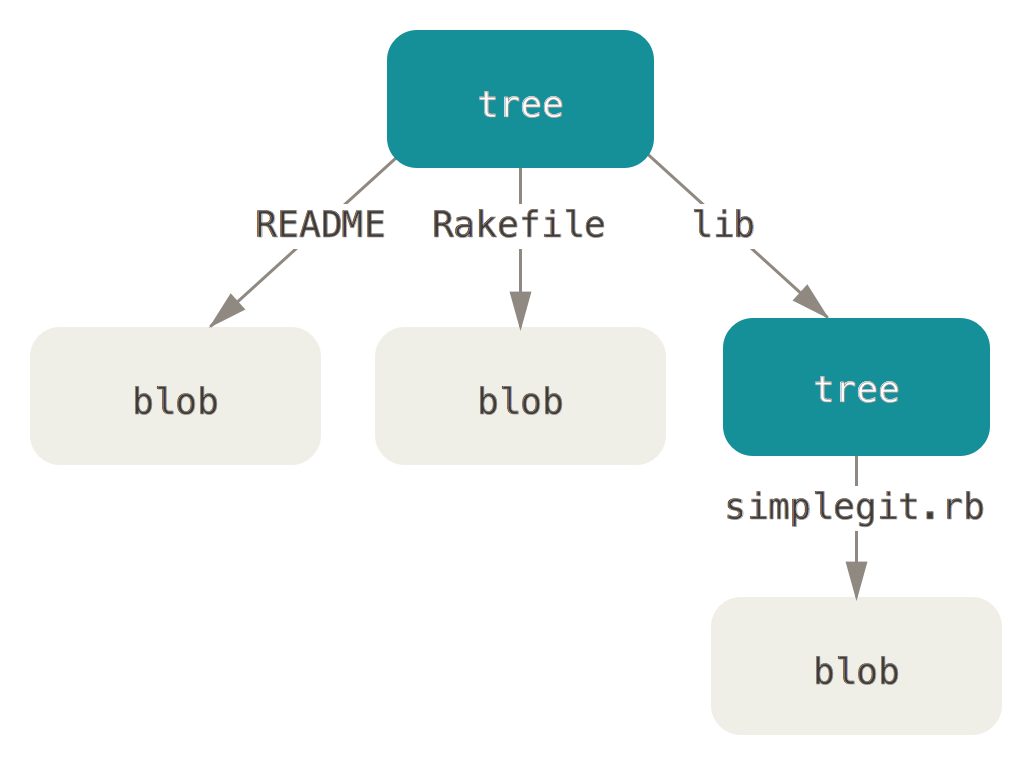
  • A pointer to 1 single Tree: a Tree is the complete snapshot of the entire project file system hierarchy, with a root pointing to Subtrees (the directories), which in turn point to Blobs (the file contents).

Let me stress that a non-conflicted commit points to exactly 1 Tree. So, it targets a coherent photograph of the project. Conversely, if there's 1 Tree, it must be coherent and complete.

From this shared basis, Git and Jujutsu dramatically diverge.

Conflicts in Git

All operations in Git are atomic and transactional: they either succeed or roll back leaving the repository exactly as it was. The one notable exception is whenever there is a conflict.

When this happens, Git is stuck halfway through of an incomplete transaction. It would know where to put the next commit (after all, its parents are known) but it really cannot forge it: there's no way to create a coherent tree.

So, Git opts for the following:

  • It decides to give up creating the Merge Commit.
  • It blocks the repository, so you cannot tamper with it anymore.
  • It provides you with the best tools it can for you to solve the conflict.
    I like to think that Git is helping you help it out of the corner it boxed itself into.
  • Since the repository became a no-fly zone, it provides you those tools outside the commit graph.

Which tools are we talking about? Git spreads its helpers in 3 places:

  • The Index: normally each file in the Index is at stage :0. During a conflict, Git stores 3 versions of the same file, to help you do a manual merge:

    • :1: the common ancestor
    • :2: the ours version
    • :3: the theirs version
  • The Conflict Markers: this is actually the only time when Git violates its own strict rules and tampers with your files, filling them with the familiar <<<<<<<, =======, and >>>>>>> indicators.

  • A bunch of state files and directories inside .git/ (depending on the command that generated the conflict you could find MERGE_HEAD, MERGE_MSG, ORIG_HEAD, CHERRY_PICK_HEAD, REVERT_HEAD, rebase-merge/, rebase-apply/ and the like).
    Since the operation was interrupted and is no longer atomic, Git uses these files to track state until you either --continue or --abort.

Long story short, as long as this situation is in place:

  • Your merge Commit is nowhere to be seen.
  • Your repo is in an exceptional state and you can't do anything but resolve the conflict.

Conflicts in Jujutsu

In case of a conflict, Jujutsu doesn't panic and doesn't bring out the big guns. It does not even generate any conflict marker. Instead, it creates the merge Change regardless. But how?

  • For the position in the history tree, that's easy: the parents have nothing to do with the conflict. Jujutsu knows where to create that Change, so you can keep moving, abandoning, squashing, restoring and rebasing it.

  • As for the content, conflicts are conflicts, and no trick can produce a consistent Tree from the thin air.
    All Jujutsu knows is that to solve the conflict with your preferred merge tool you will need to the Parent 1's Tree, the Parent 2's Tree and the Base's Tree. Why not return all of them?

After all: nothing prevents us from storing more than one Tree.

Conflicted Changes

Yep. Changes in Jujutsu can carry more than 1 Tree. What are you staring at? Haven't you ever seen a little Change with leg braces before?1

A Jujutsu Change in general holds a collection of Trees.

  • If that collection contains 1 Tree only, then it's an unconflicted one.
  • If there's more than 1, then there is some merge move to complete.

This normalization lets Jujutsu consistently treat unconflicted and conflicted Changes. Again: the design principle is reducing exceptional cases to the bare minimum.

The Algebra Of Conflicts

An amazingly convenient way to represent and interpret those multiple Trees referenced by a Change is reading them as an algebraic expression with + (apply) and - (diff) signs. Imagine:

  • T − F is the diff between the Change T and F. So, basically, the changes to apply starting from F to get to T.
  • content + diff means applying a change on top of a state, getting back a new state.

Don't worry, it's just basic arithmetic.

A failed merge between X and Y is stored like Y + (X − B). It means:

  • Consider (X - B), the diff between X and its base B.
  • Apply it to Y.

In the happiest scenario, Jujutsu will run that operation converging to a nice, conflictless result.
If it fails, well, it just records the trees of Y, X and B, meaning:

I need to do Y + (X − B), help me.

A Concrete Example

Say you have the 1-line file greetings.txt in 3 Changes: B, the common base, and 2 changes, X and Y. For the sake of simplicity, Change messages match the file content:

○    Y    hello mundo
│ ○  X    hola world
├─╯
○    B    hello world

Merge X and Y with jj new X Y:

×    M    hola mundo   <- conflict
├─╮
│ ○  Y    hello mundo
○ │  X    hola world
├─╯
○    B    hello world

Both changes touch the same line, so you get a conflict.
The merge Change M records three tree pointers: [X, Y, B] with this interpretation:

X + (Y − B)

Read it as:

Starting from B, we obtained Y thanks to the diff (Y - B).
We want to apply the same change to X.
So, the result is X + (Y - B)

Jujutsu will fail to reduce this to 1 single Tree, so the Change is conflicted. Yet it's there, and no fire alarm is wailing.

You can safely jj edit M and resolve the conflict. Take your time; there's no hurry.

Simplifications

You can interpret those expressions the same way you read sums and subtractions.
Say a Change has content: B + (X - B). It means:

  • Consider the diff that, from the base B, takes to X.
  • Apply it to B.

Think about it: this is equivalent to X, isn't it?
Even further, the grade school student in you would recall that:

B + (X - B)

simplifies to

X

simply because B and -B cancel. You see how the 2 models match.

Wrongly Applied Diffs

In a sense, you could say that:

A conflict is a diff applied to the wrong base.

The diff (X - B) applies cleanly to base B:

B + (X - B) = X

Apply it to the wrong base:

Y + (X - B)

and you might get a conflict: Jujutsu will do its best, based on the actual file contents, to apply that diff. If it fails, it will store the Trees of Y, X and B hoping that:

  • Either you fix the files.
  • Or you move Changes around so an algebraic simplification magically removes the conflict.

Back to Grade School!

This idea of handling conflict via algebraic expressions is cool. Let's play with the greetings.txt file again. Consider this:

  • Start from hello world in the base B.
  • On top of it, put an edit H.
  • Stack another edit S on top.
                                        the base    the diff
                                              |      |
                                              |      |
○  S    hola -> salut => salut world     S  = H + (S − H)
○  H    hello -> hola => hola world      H  = B + (H − B)
○  B    hello world

Now,

  • Revert H with jj revert H (it works just like git revert).
×  P'   conflict                         P' = S + (B − H)
○  S    hola -> salut => salut world     S  = H + (S − H)
○  H    hello -> hola => hola world      H  = B + (H − B)
○  B    hello world

A revert is just the inverse edit: so, it carries the inverse of H's diff, -(H - B) or (B − H).
The diff's natural base is H. But it landed on S.

P' wants to apply (B − H), which expects hola under it. Instead it sits on S, which says salut. A diff on the wrong base: conflict.

You know where the conflict comes from: a wrong base. Change it:

jj rebase -r P' -d H

○  P'   hello world                   P' = H + (B − H) = B
│ ○  S    salut world
├─╯
○  H    hola world
○  B    hello world

We went from S + (B − H) to H + (B − H). Now, +H and −H cancel, leaving B.The expression collapsed to a single Tree: the conflict is gone.

You resolved the conflict with a rebase, no file edits needed. Without the algebraic model, this would seem like magic.

Resolving Conflict by Abandoning Changes.

Abandoning the middle Change would have worked too. Going back 1 step:

×  P'   conflict                         P' = S + (B − H)
○  S    hola -> salut => salut world     S  = H + (S − H)
○  H    hello -> hola => hola world      H  = B + (H − B)
○  B    hello world

Drop S and P' lands on H:

jj abandon S

○  P'   conflict                         P' = H + (B − H) = B
○  H    hello -> hola => hola world      H  = B + (H − B)
○  B    hello world

Same cancellation, different move.

That's the idea: a conflict is just a diff parked on the wrong base. rebase, abandon, whatever move puts the diff back where the algebra simplifies it makes the conflict vanish.

Markers Are An Illusion

Have you noticed? When you visit a Conflicted Change, you'll find conflict markers. Yet conflict markers don't exist in the repository! They're generated on the fly, the moment you visit the Change. At that point Jujutsu makes its analysis, isolates the unresolved parts, and translates them into text, for your convenience.
When you save the edited file it goes the other direction: it parses the conflict markers and recreates the logical conflict state from them.

Because markers are generated on the fly, you can pick which style Jujutsu uses. There are 3 built-in styles.
In Git this would not be possible: there the markers are the conflict.


  1. https://www.youtube.com/watch?v=ocEuDQk7bEI