Quick Start
1. Setup
Install Jujutsu. Then, clone the sample repository:
jj git clone https://codeberg.org/arialdo/jj-quick-start.git
cd jj-quick-start
Track all the remote branches:
jj bookmark track "*" --remote origin
2. Git Compatible
This is an ordinary Git repo. You can mix Jujutsu's and Git's commands:
$ git log --oneline --graph --all
* f3d91ac
* 8dda056 (HEAD)
| * f0218b5
| * fa832fc (origin/store, store) Add `done` command
| * c495748 Store tasks in ~/.taskr.json
|/
| * beea00e (origin/dev, dev) WIP: parse --due dates
| * 6b0b88b Add LICENSE
| * 403d415 Sort tasks by priority
| * b6107c0 debug: dump args to stderr
| * b58bf2f Add serach by tag
| * 068609d Add --priority flag
|/
* 06acab9 (origin/main, main) taskr app
The project is a short todo list in Python. We don't care what it does. We will mainly focus on the shape of its history.
3. jj log
Log the history tree with Jujutsu:
jj log
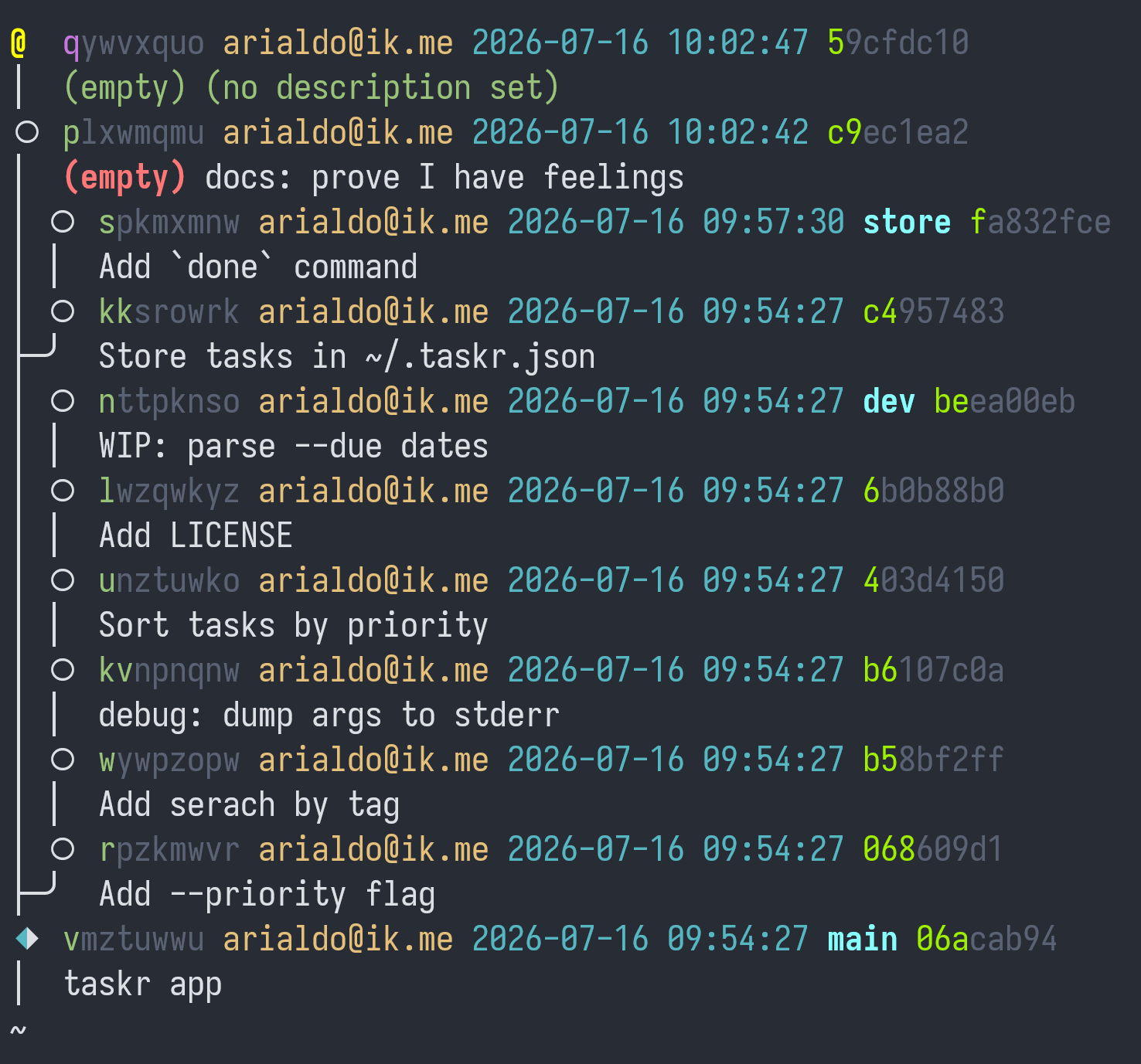
I prefer a more compact template:
jj log -T builtin_log_oneline
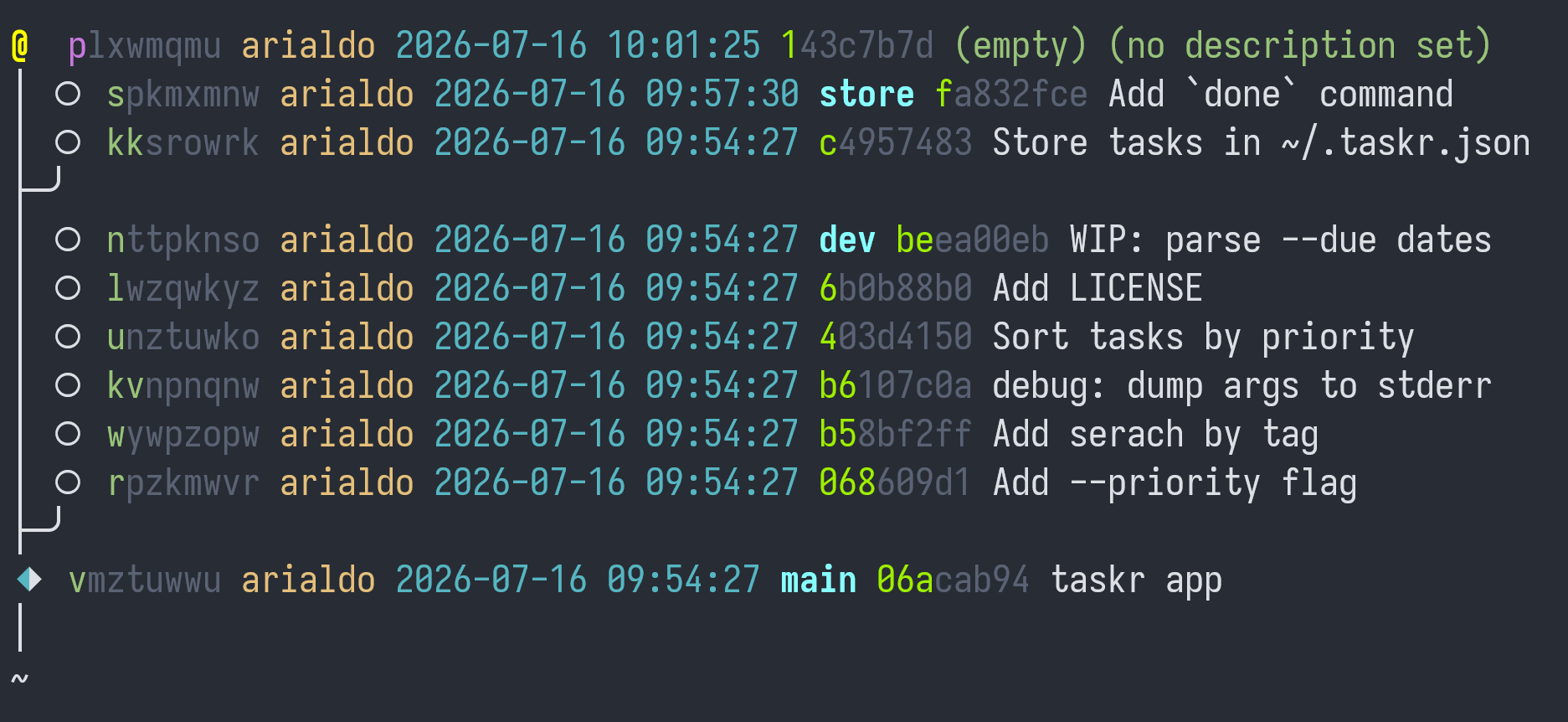
Bullet shapes have the following meaning:
| Symbol | Meaning |
|---|---|
○ | Ordinary commits. Consider them editable. |
◆ | Immutable commits that belong to the remote trunk. Git lets you play with them, then it will complain, too late, rejecting your next push. Jujutsu stops you beforehand. |
@ | Your working copy. |
Commits have 2 identifiers:
- One on the right, such as
fa832fce.
This is the ordinary SHA1. Rebase or amend a commit, the SHA-1 will change. - One on the left, such as
spkmxmnw.
This is the Change ID. This identity stays the same no matter the operations you perform.
Notice how Jujutsu highlights the few characters that suffice to unambiguously reference a commit.
4. Commit
@ is both your working copy and a real commit. When you edit files,
you also modify the commit itself. Editing the repository directly
might sound scary, but don't worry: it's a feature, not a bug. You
will learn in The Squash
Workflow and Dispatching Edits
from Megamerges how to leverage this
super-power.
One surprising consequence: in Jujutsu, you typically commit before you code. Here's how it works.
Describe beforehand your work:
jj describe -m "docs: prove I have feelings"
Create a new empty commit:
jj new
Log all current commit's ancestors:
jj log -r ::@

Do you see the 2 empty commits on the top? Think of them like the
working copy and the index, in Git.
Now, code:
$ echo "Written with ❤️" >> README.md
$ jj st
Working copy changes:
M README.md
Working copy  (@) : qywvxquo f338a3de (no description set)
Parent commit (@-): plxwmqmu c9ec1ea2 (empty) docs: prove I have feelings
As you see, your changes are already part of the commit. Jujutsu has
no equivalent to git add.
Finish the session by sending your changes 1 commit back, where they
belong:
jj squash
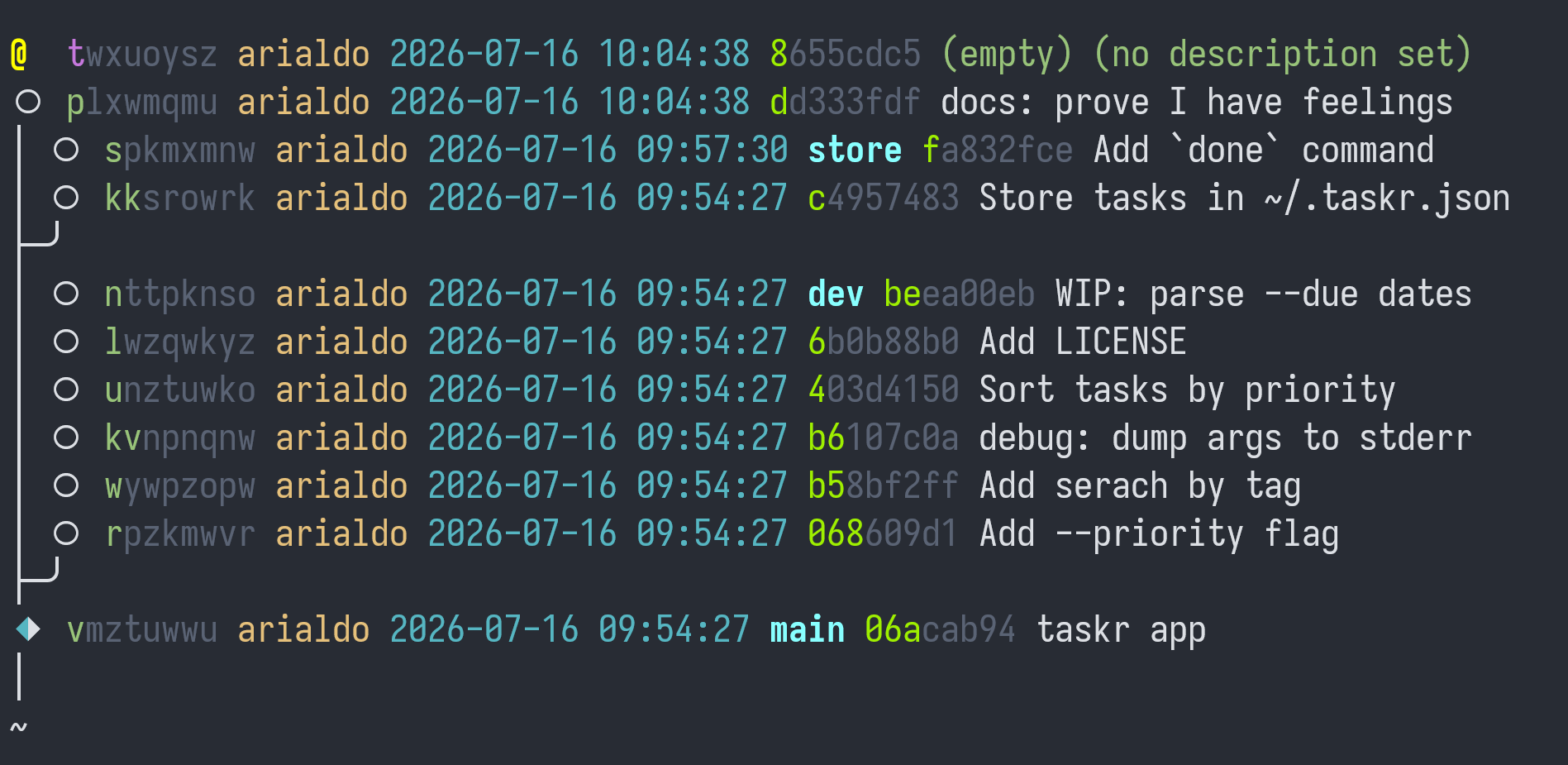
Good, your change landed in nm and you are now in a fresh, empty
commit.
5. The Typo In The Old Commit Message
Look at this commit:
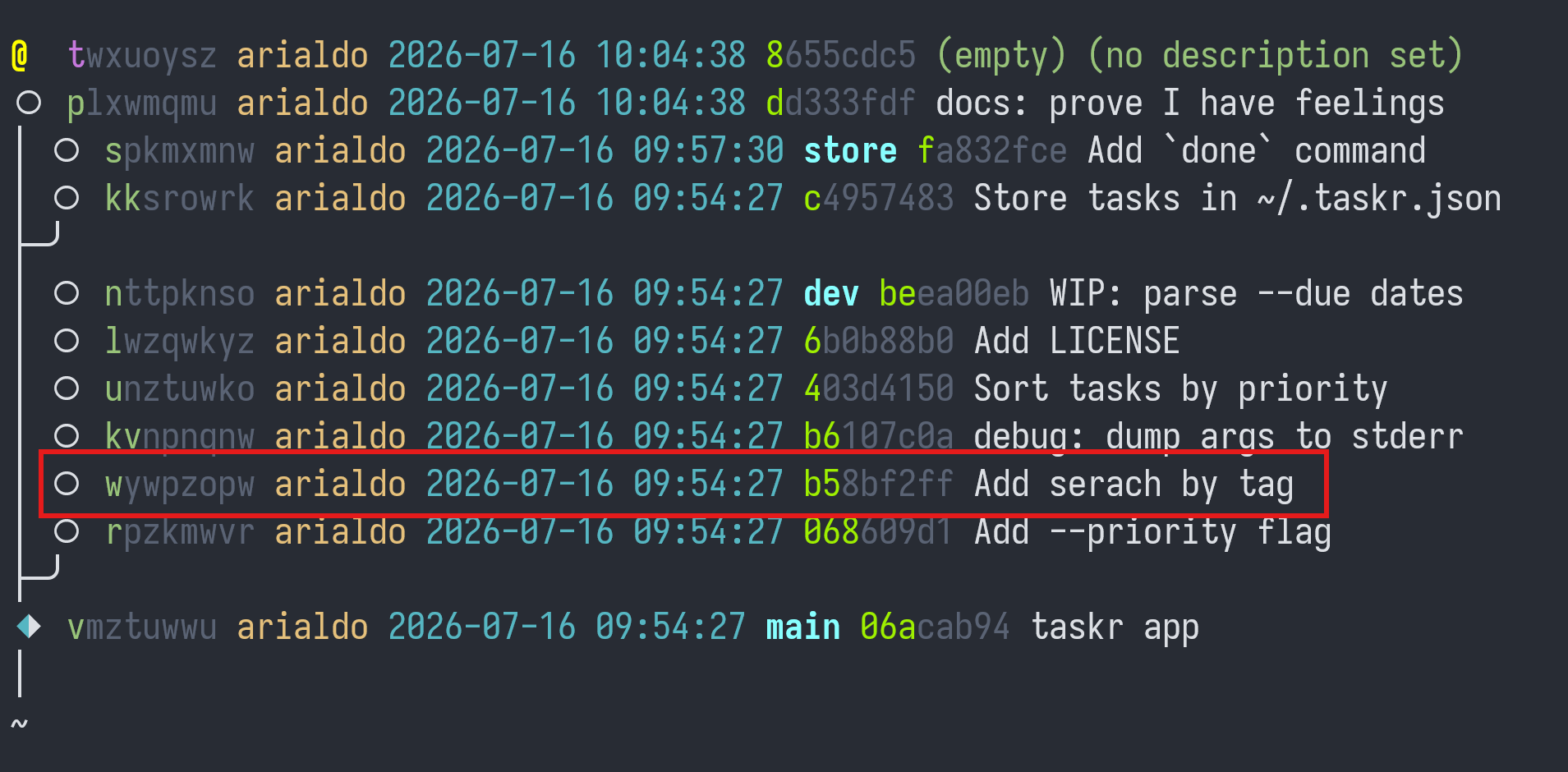
There's a typo in the description. Before, you have used jj description (desc for short) to describe the current commit. You
can use the same command with past commits too:
$ jj desc -r w -m "Add search by tag"
Rebased 4 descendant commits
Working copy (@) now at: ovxurmlk 88f2c0d6 (no description set)
Fixed. Notice the message
Rebased 4 descendant commits
As you manipulate commits, Jujutsu performs the needed rebases on the
fly. Basically, you can treat all the commits as mutable, no matter where they are.
Notice how the SHA-1 values changed, while the Change IDs are still
the same.
6. Rebase
Say you want to rebase dev on top of store:
jj rebase -b dev -o store
Jujutsu replies with
Rebased 6 commits to destination
But then it adds:
New conflicts appeared in 5 commits:
  nttpknso 219791e0 dev* | (conflict) WIP: parse --due dates
  lwzqwkyz 83c89c2d (conflict) Add LICENSE
  unztuwko ee801a30 (conflict) Sort tasks by priority
  kvnpnqnw ed1c4a78 (conflict) debug: dump args to stderr
  wywpzopw 2ffce574 (conflict) Add search by tag
Hint: To resolve the conflicts, start by creating a commit on top of
the first conflicted commit:
  jj new wywpzopw
Then use `jj resolve`, or edit the conflict markers in the file directly.
Once the conflicts are resolved, you can inspect the result with `jj diff`.
Then run `jj squash` to move the resolution into the conflicted commit.
Gosh, conflicts!
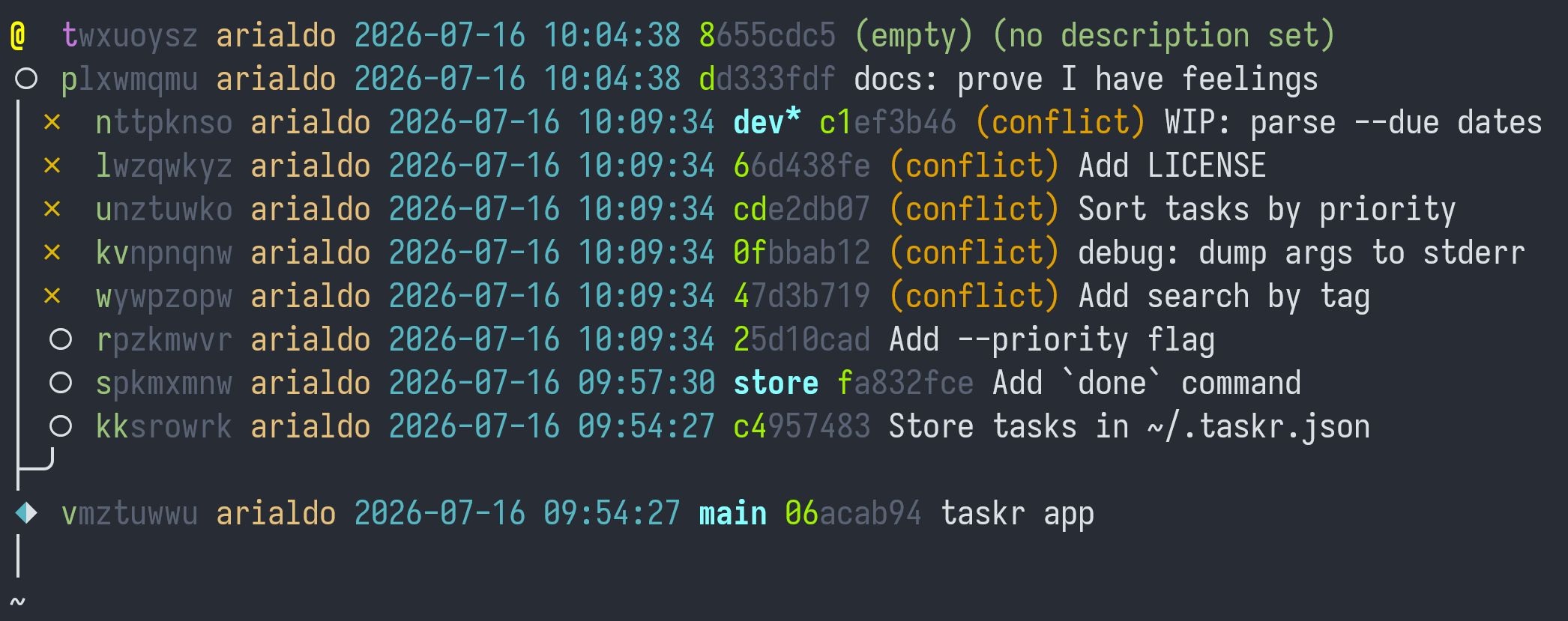
Two things to notice:
- First, you rebased a branch while you were somewhere else. Git doesn't let you do that.
- Second, interestingly Jujutsu did not stop because of conflicts: it completed the rebase nevertheless, and now it shows where the conflicts are. You can keep working and resolve the conflicts when you prefer. You'll find plenty of information and tricks in the chapter Conflicts.
Should you want to undo the rebase, you could run jj undo: it's a
passe-partout command that undoes whatever operation you run, no
exceptions. Give it a try:
jj undo
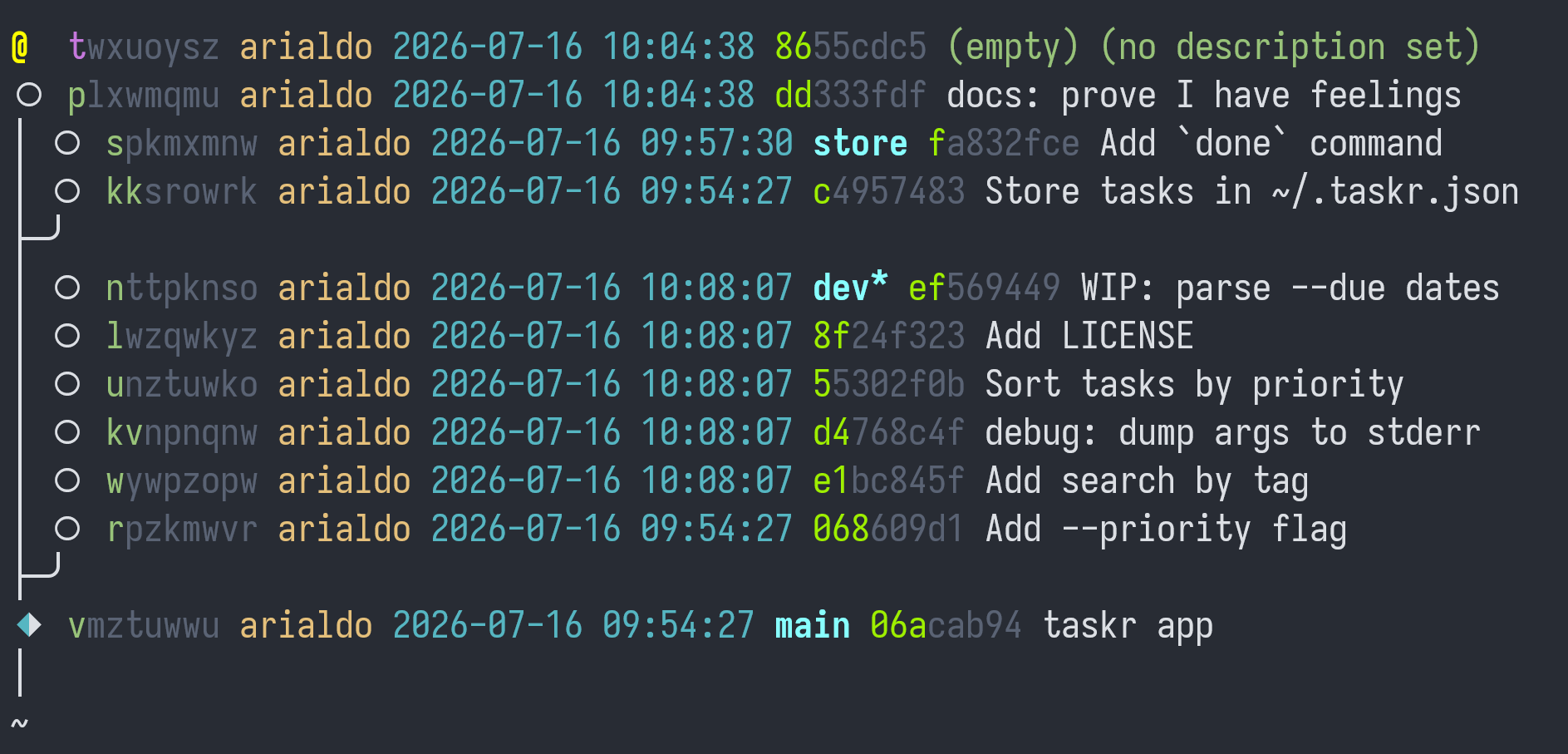
The rebase is gone, and so are the conflicts. You could keep running
jj undo until you are back to the very moment you cloned the repository.
Now try to undo the undo:
jj redo
You are back to the future, to the conflicted state.
You can go back and forth in the operation history with jj undo, jj redo and other powerful sub-commands under the jj op command. Think
of them as Git's reflog on steroids. You will read about them in It's
History All The Way Down.
7. Rebase a Conflicted Branch
On second thought, you wanted to rebase store on top of dev, not
the other way around. So, you need to move the commits from kk to
s on top of n / dev:
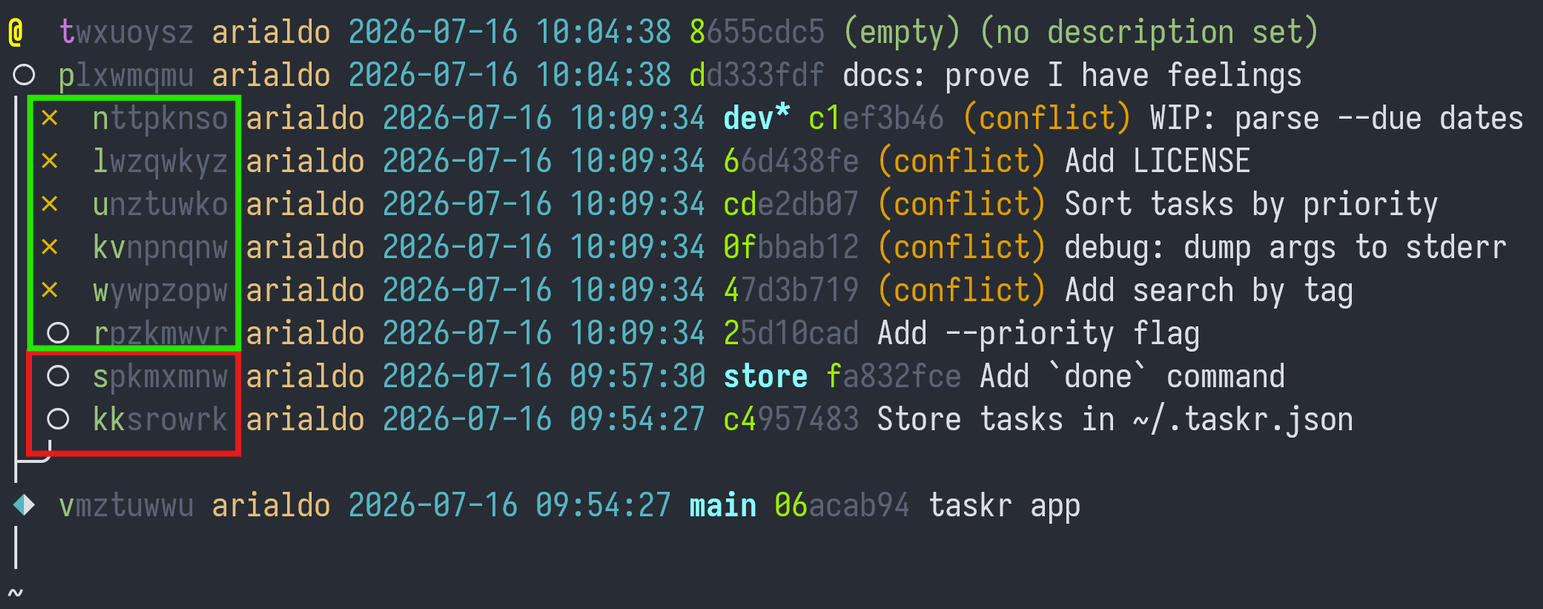
Run:
jj rebase -r 'kk::s' -o dev
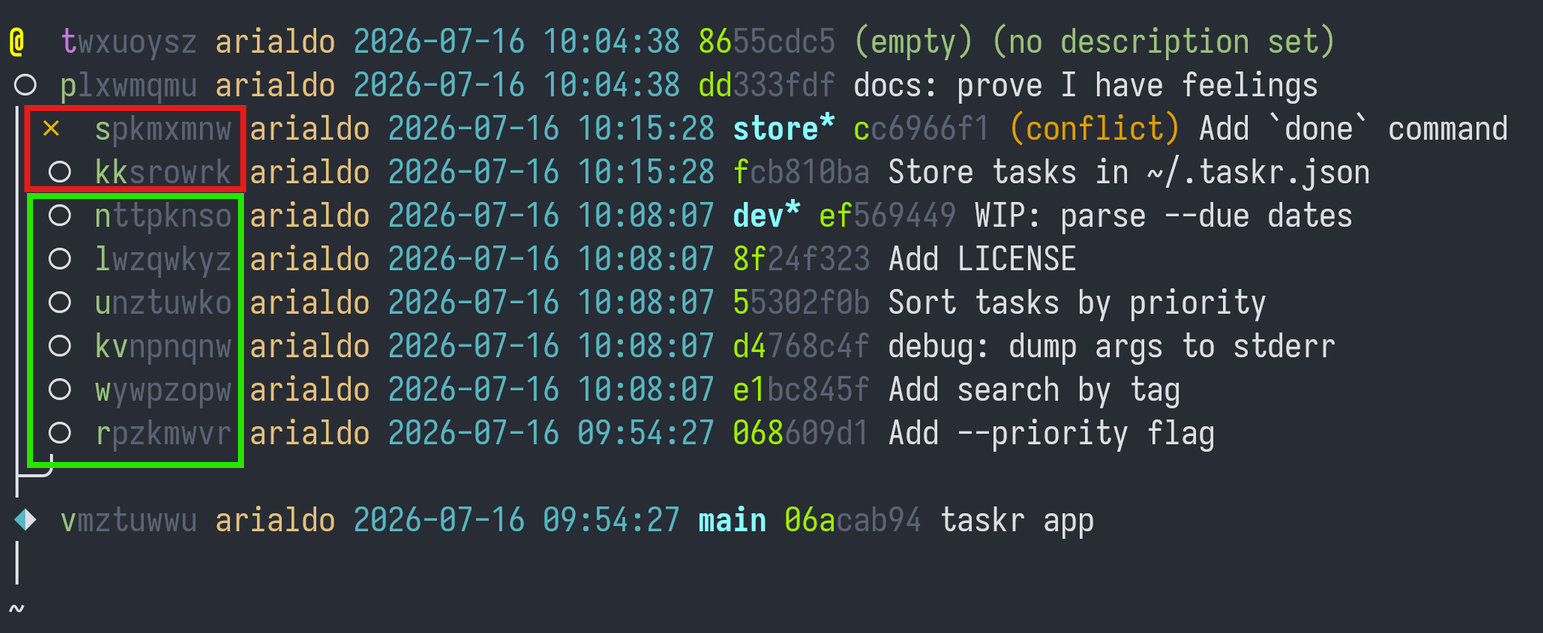
Much better, only 1 conflict.
Time to resolve the conflict. You move on top of the conflicted commit
s:
jj new s
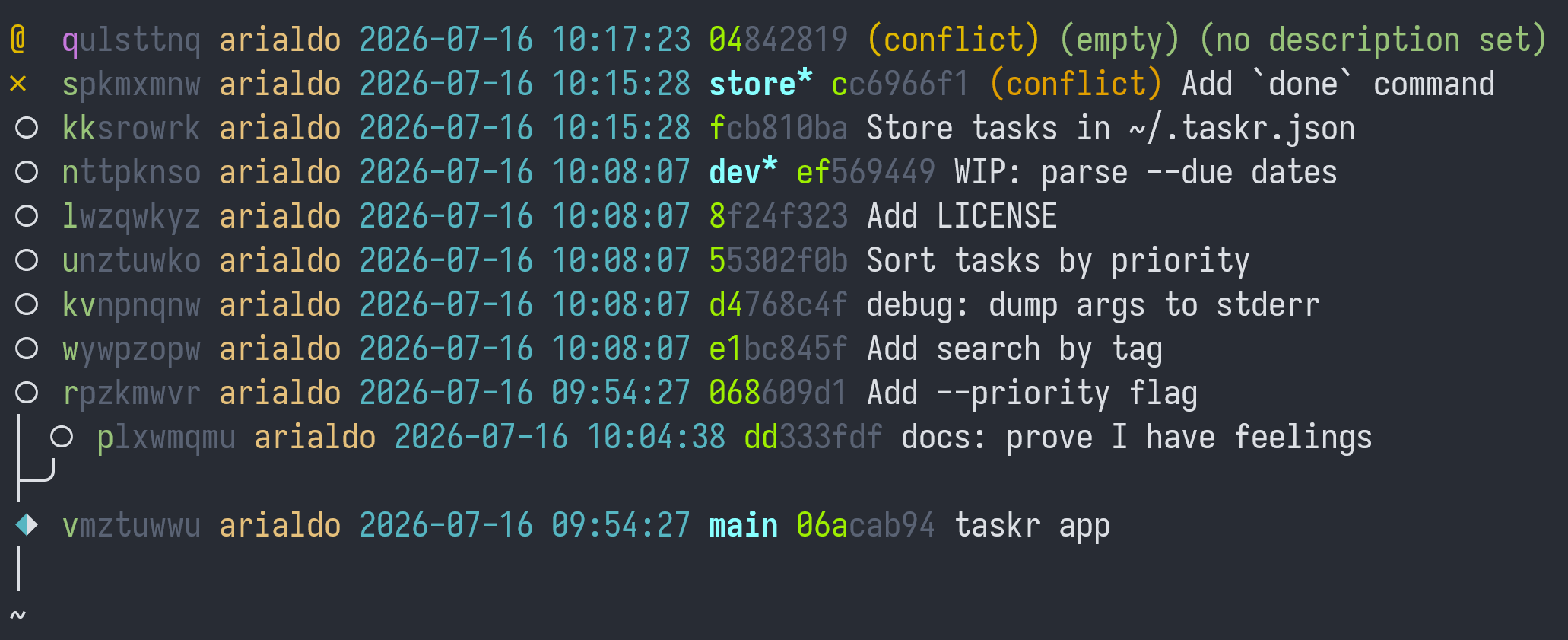
You'd better fix it later, though: your boss is yelling at you about some SUPER URGENT tasks.
8. Amending a Commit From a Distance
"RED ALERT!", "your boss panics "there's a bug! DROP EVERYTHING, you
MUST fix it NOW!"
It's about this code:
if len(args) >= 2 and args[0] == "--priority":
    priority = int(args[1])
    args = args[2:]
Nothing alarming, you think: you get an exception if args[1] isn't a
number. You just need to add error handling around it. Which commit
introduced the expression int(args[1])?
$ jj log -r 'diff_lines(substring:"int(args[1])")'
○  rpzkmwvr arialdo 2026-07-16 09:54:27 068609d1 Add --priority flag
│
~
Here's the culprit.
diff_lines(substring:"int(args[1])") is an example of a Revset: an
expression in a powerful (yet intuitive) purely functional language
for selecting commits. In Git, revision selection is a pile of
non-composable fragments (such as HEAD~3, main..feature,
--author=alice, -S"int(args[1])") each available only where it was
bolted on (e.g., git log takes -S, git rebase doesn't). In
Jujutsu it's one single, consistent language that every command
shares.
Anyway, look! The bug hasn't been introduced by your current commit, but 5 commits down the stack. No problem, you'll fix it from a distance.
Wait, what? You are in a conflicted commit! Can you really code while
there are pending conflicts? Yes, you can: after all, the bug fix is
about r, a conflict-free commit.
So, amend cmd_add in commands.py from your current commit:
def cmd_add(args):
    priority = 3
    if len(args) >= 2 and args[0] == "--priority":
        try:
            priority = int(args[1])
        except ValueError:
            print("priority must be a number", file=sys.stderr)
            return 2
        args = args[2:]
    due = None
    ...
Review it, then send it five commits down:
$ jj squash --into r
Rebased 7 descendant commits
Working copy  (@) now at: wmlyyqmm ef6c08d3 (conflict) (empty) (no description set)
Parent commit (@-)      : spkmxmnw e4538e55 store* | (conflict) Add `done` command
Cool, your fix landed in r. Seven commits, including your working
copy, rebased on top of it. Boss (slightly) happier.
Jujutsu reminds you that you still have conflicts in s:
Warning: There are unresolved conflicts at these paths:
taskr.py    2-sided conflict
Existing conflicts were resolved or abandoned from 1 commits.
There are still unresolved conflicts in rebased descendants.
Hint: To resolve the conflicts, start by creating a commit on top of
the conflicted commit:
  jj new spkmxmnw
Then use `jj resolve`, or edit the conflict markers in the file directly.
Once the conflicts are resolved, you can inspect the result with `jj diff`.
Then run `jj squash` to move the resolution into the conflicted commit.
9. Amending The Last Commit
Your boss (who else?) pushes for dev to be completed. The code in
n is unfinished:
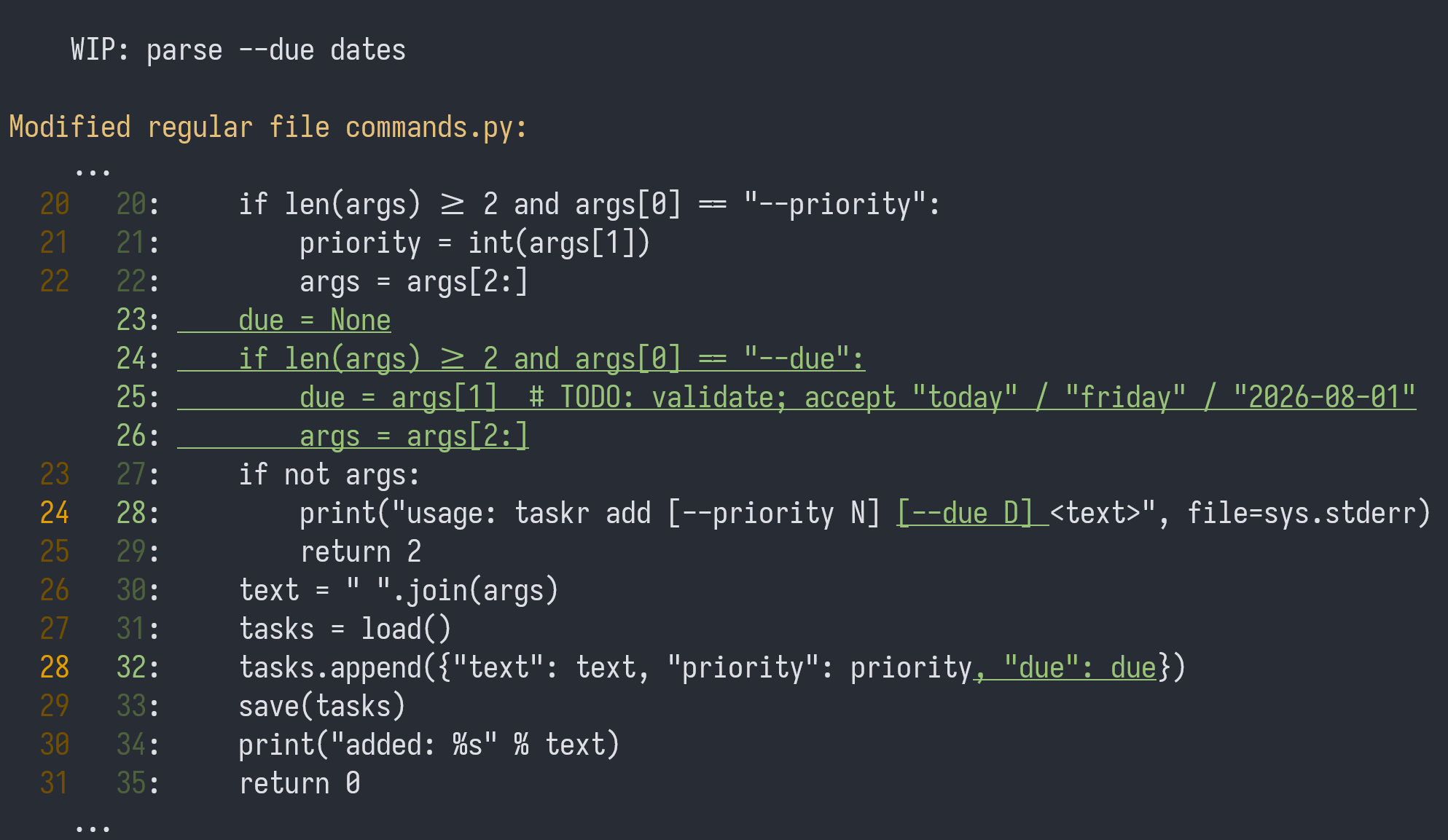
It parses --due but never displays it, which is probably why it
still says WIP. "FINISH IT!", boss commands. Yes, Sir!
The commit dev lays right in the middle of a chain of commits, but
that's not a problem, it's always the same pattern:
$ jj new TARGET   # create a working staging area.
$ emacs FILE      # write code (choose your editor wisely, no pressure)
$ jj diff         # review what you did.
$ jj squash       # incorporate in the commit.
So:
jj new dev
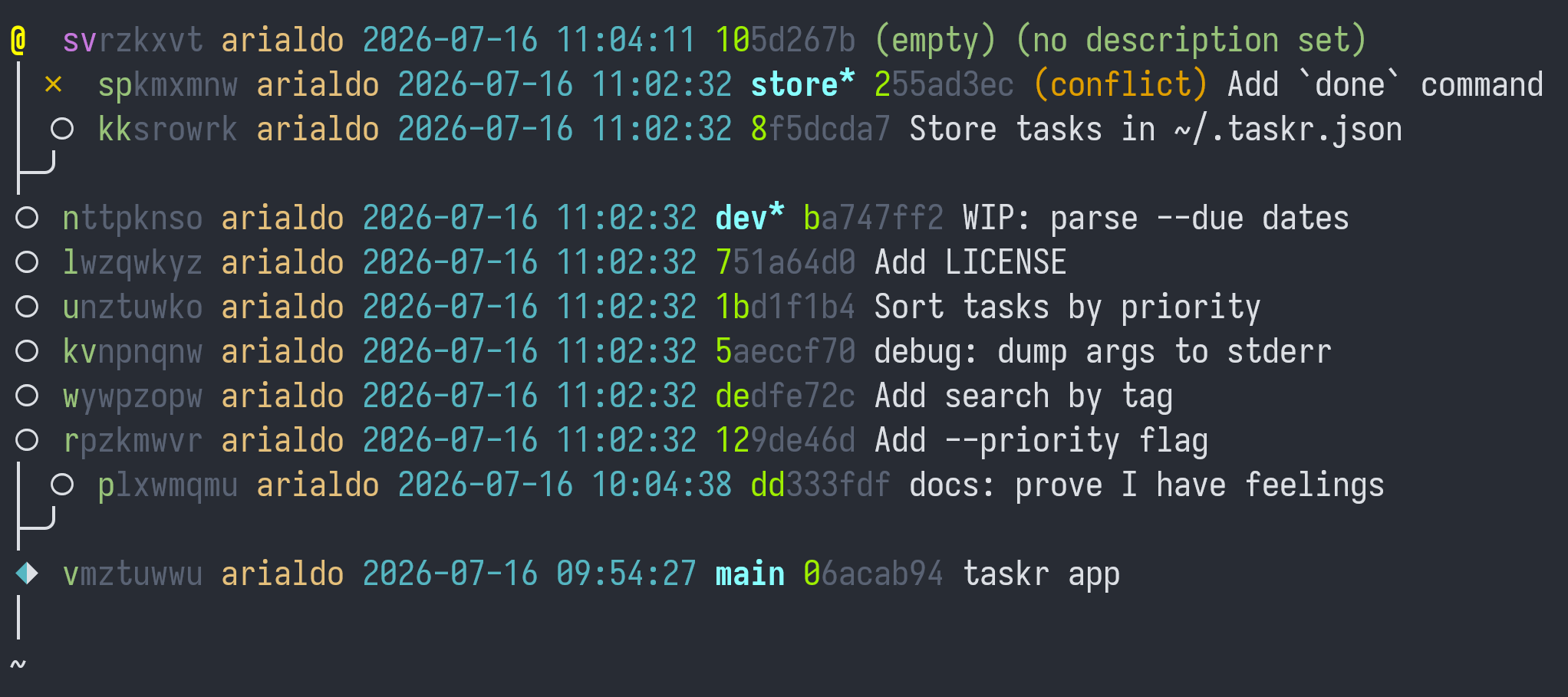
Change cmd_list in commands.py to:
def cmd_list(args):
    tasks = load()
    if not tasks:
        print("no tasks")
        return 0
    ordered = sorted(tasks, key=lambda t: t.get("priority", 3))
    for n, task in enumerate(ordered, 1):
        suffix = " (due %s)" % task["due"] if task.get("due") else ""
        print("%2d. [%d] %s%s" % (n, task.get("priority", 3), task["text"], suffix))
    return 0
Review your change before amending the commit:
$ jj diff
Modified regular file commands.py:
    ...
  47   47:         return 0
  48   48:     ordered = sorted(tasks, key=lambda t: t.get("priority", 3))
  49   49:     for n, task in enumerate(ordered, 1):
  50   50:         suffix = " (due %s)" % task["due"] if task.get("due") else ""
  50   51:         print("%2d. [%d] %s%s" % (n, task.get("priority", 3), task["text"], suffix))
  51   52:     return 0
  52   53:
  53   54:
   ...
Fine. Squash your work to n, and amend the description:
$ jj squash -m "Parse --due dates"
Working copy (@) now at: ovxurmlk 3e81b7a4 (empty) (no description set)
Parent commit (@-)      : qpvuwxyt 2c5f9e13 Parse --due dates
You'll read about this workflow in Don't Edit.
10. Throwing a Commit Away
You are ready to resolve the conflict when you notice the commit
kv:
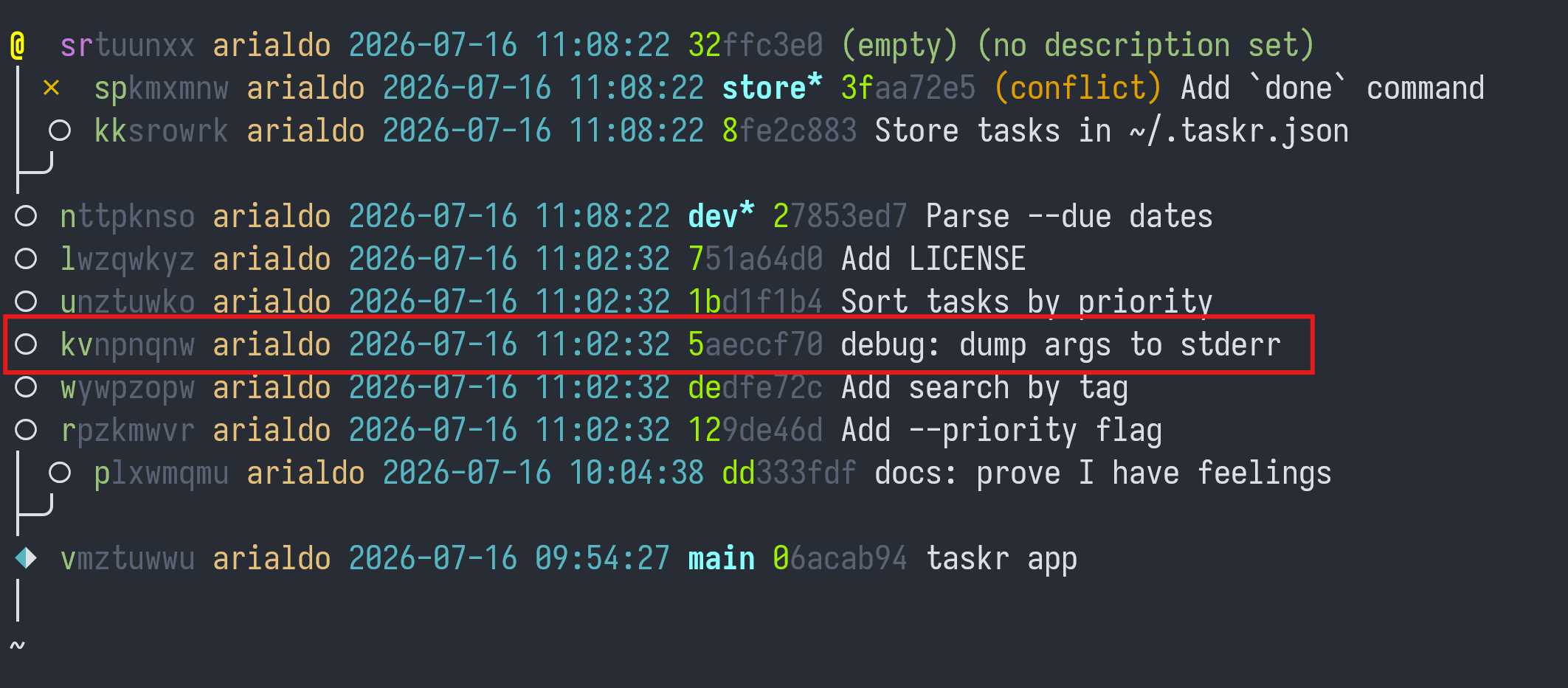
What is it about?
jj show kv
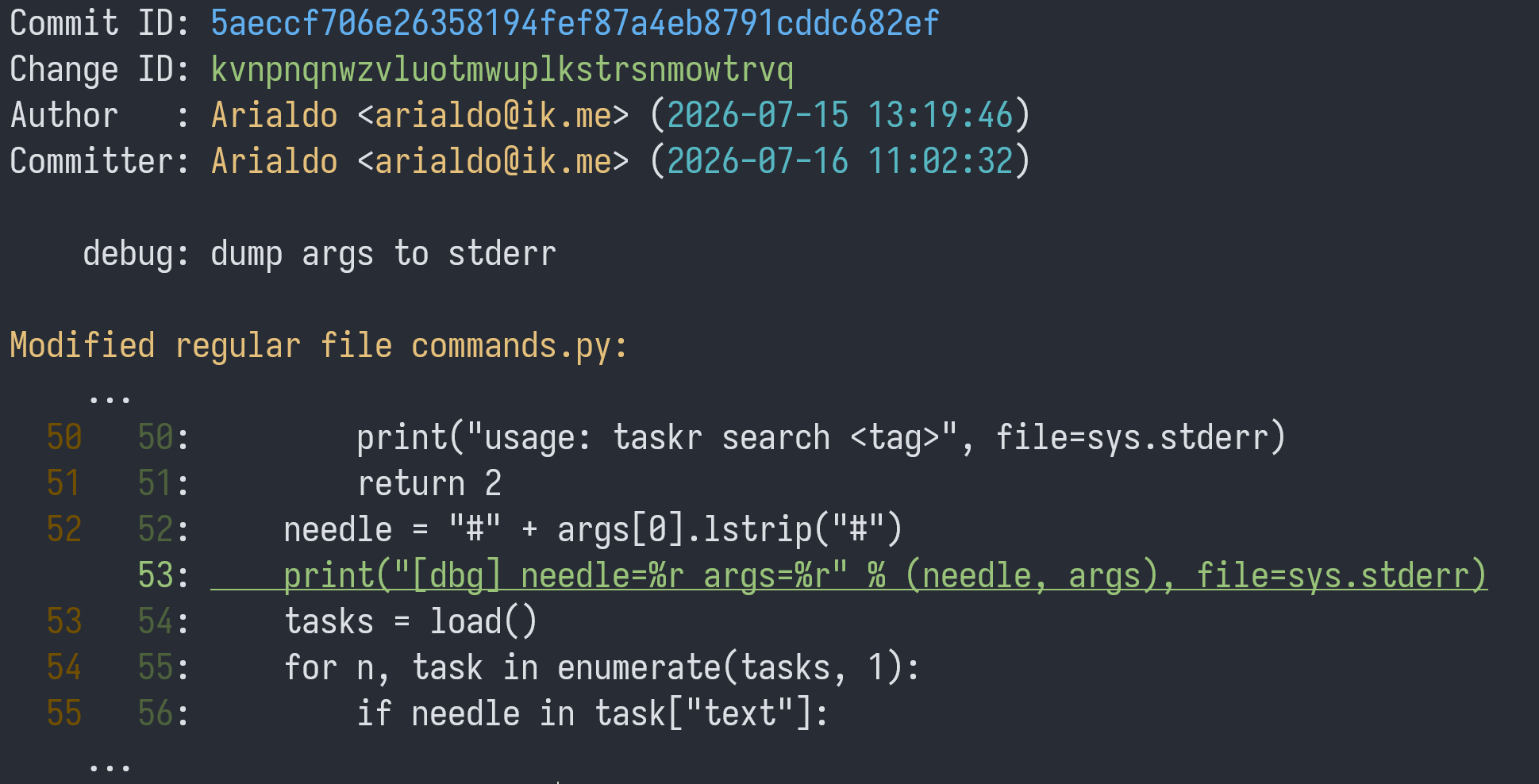
Ha! A stray troubleshooting print. The whole commit can be completely abandoned:
$ jj abandon kv
Abandoned commit vkrysnwp 2a9f0c15 debug: dump args to stderr
Rebased 4 descendant commits onto parent of abandoned commit
Working copy (@) now at: pzrtklvq 4a7c1d92 (empty) (no description set)
Looks like your boss isn't the only reason you've been putting off that conflict resolution, eh?
11. Resolve The Conflict
Where was the conflict, by the way?
$ jj log -r 'conflicts()'
×  spkmxmnw arialdo 2026-07-16 11:12:20 store* 07aa62de (conflict) Add `done` command
│
~
Let's go there:
$ jj new sp
$ jj resolve --list
taskr.py    2-sided conflict
$ jj resolve --tool meld
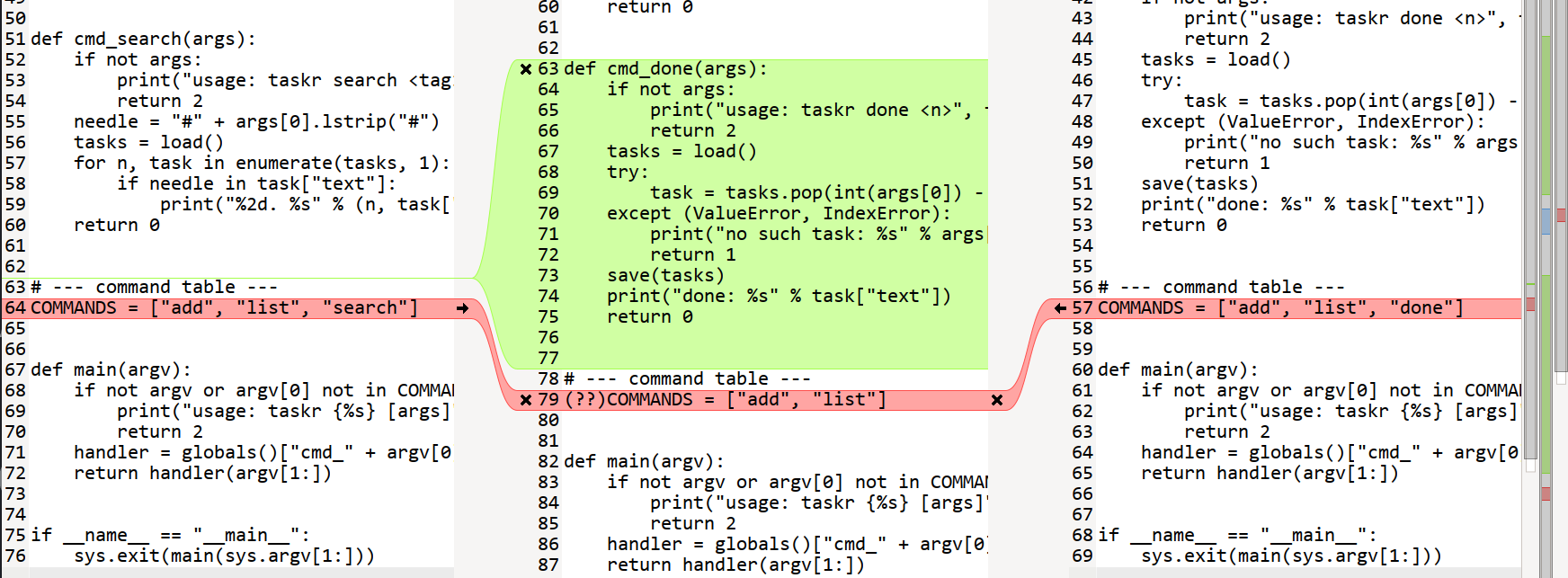
Both sides want their command in the list. Both should succeed, so you can replace the conflict with:
COMMANDS = ["add", "done", "list", "search"]
$ jj st
Working copy changes:
M taskr.py
Working copy  (@) : pputmlzu 3474f499 (no description set)
Parent commit (@-): spkmxmnw 07aa62de store* | (conflict) Add `done` command
Hint: Conflict in parent commit has been resolved in working copy
Good, no more conflicts.
jj squash
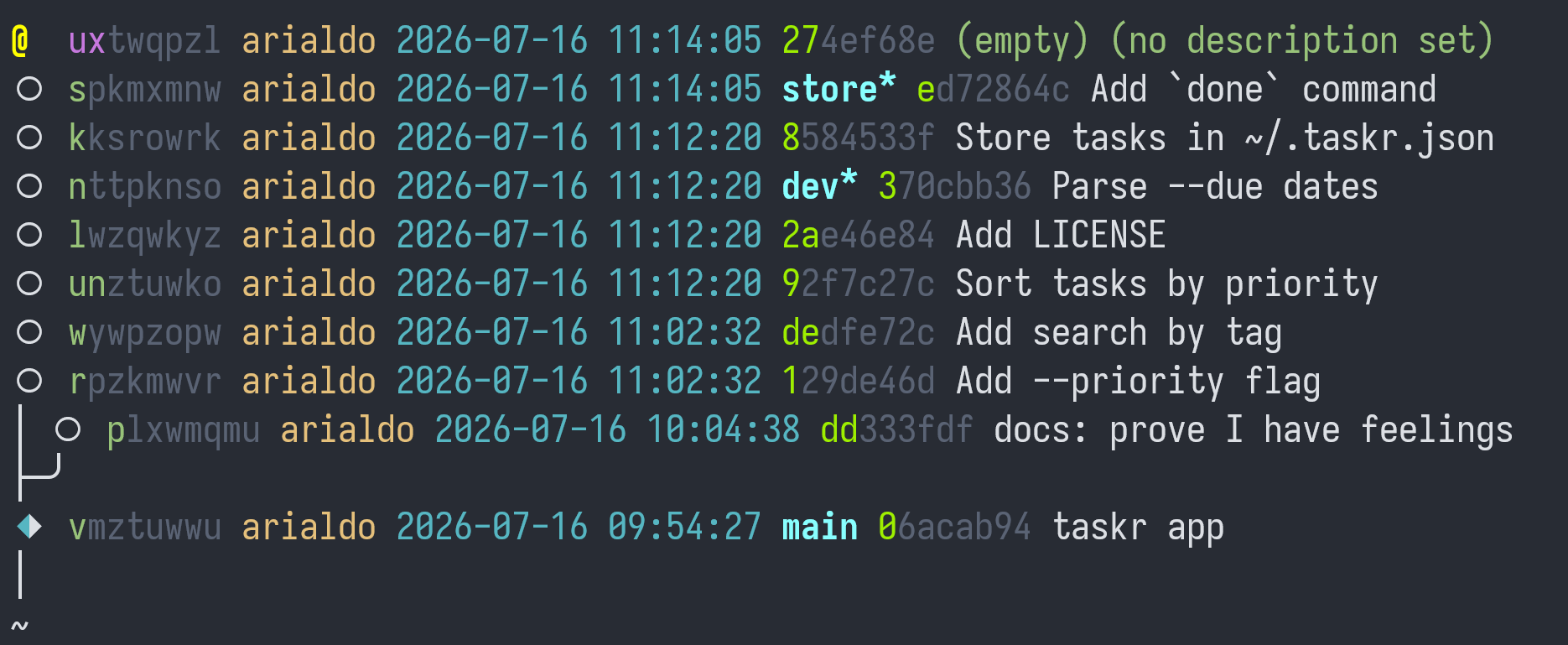
All clear!
12. Moving License
Look at this commit:
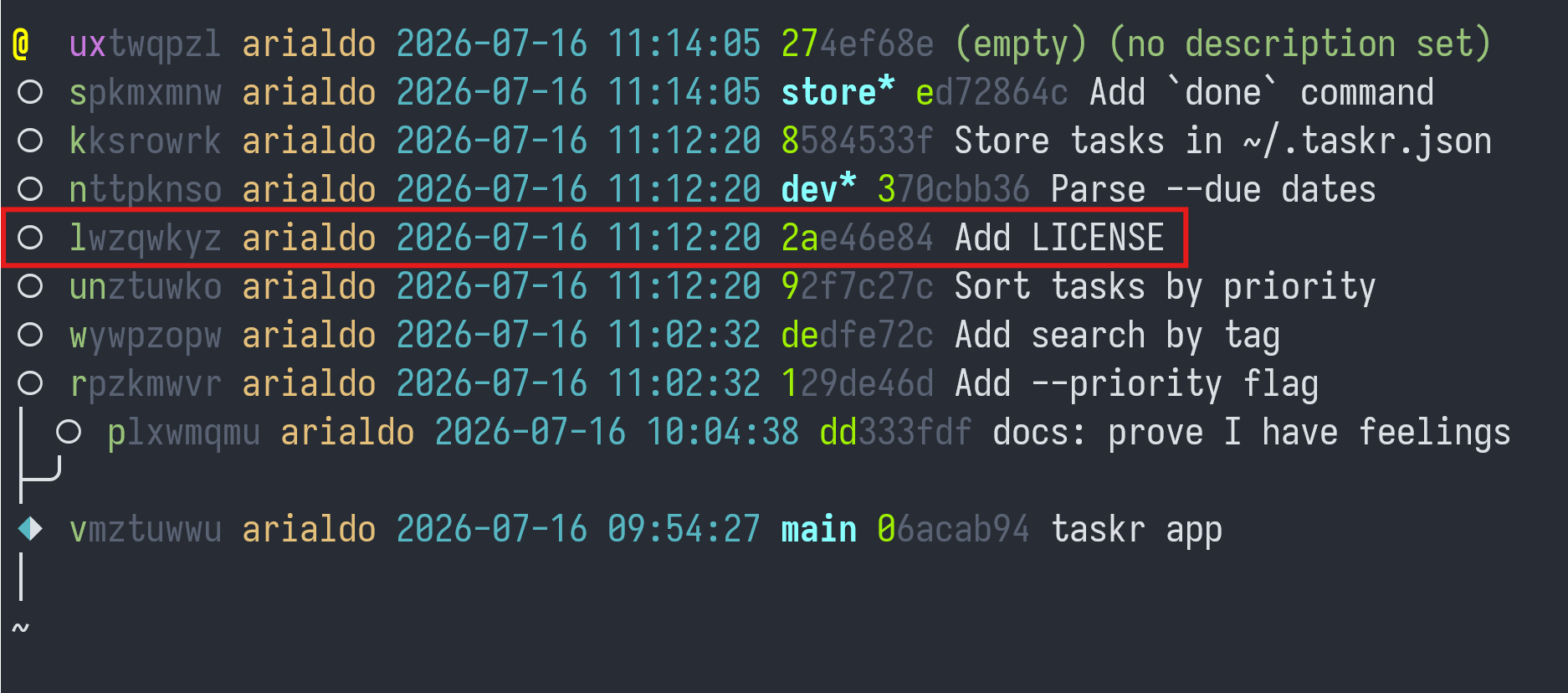
It seems that the license file was added too late, only when somebody
noticed it was missing. Move it where it belongs, before commit
v. It should have been there from the start:
jj rebase -r l --before v
Uh oh! It's time for Jujutsu to whine:
Error: Commit 06acab9454ba is immutable
Hint: Could not modify commit: vmztuwwu 06acab94 main | taskr app
Hint: Immutable commits are used to protect shared history.
Hint: For more information, see:
      - https://docs.jj-vcs.dev/latest/config/#set-of-immutable-commits
      - `jj help -k config`, "Set of immutable commits"
Hint: This operation would rewrite 1 immutable commits.
Good boy! Jujutsu saves you before the damage is done! Git would let you rebase and surprise you with a: "Hello, rejected push!" later.
If you really insist, you can always use --ignore-immutable:
jj rebase -r l --before v --ignore-immutable
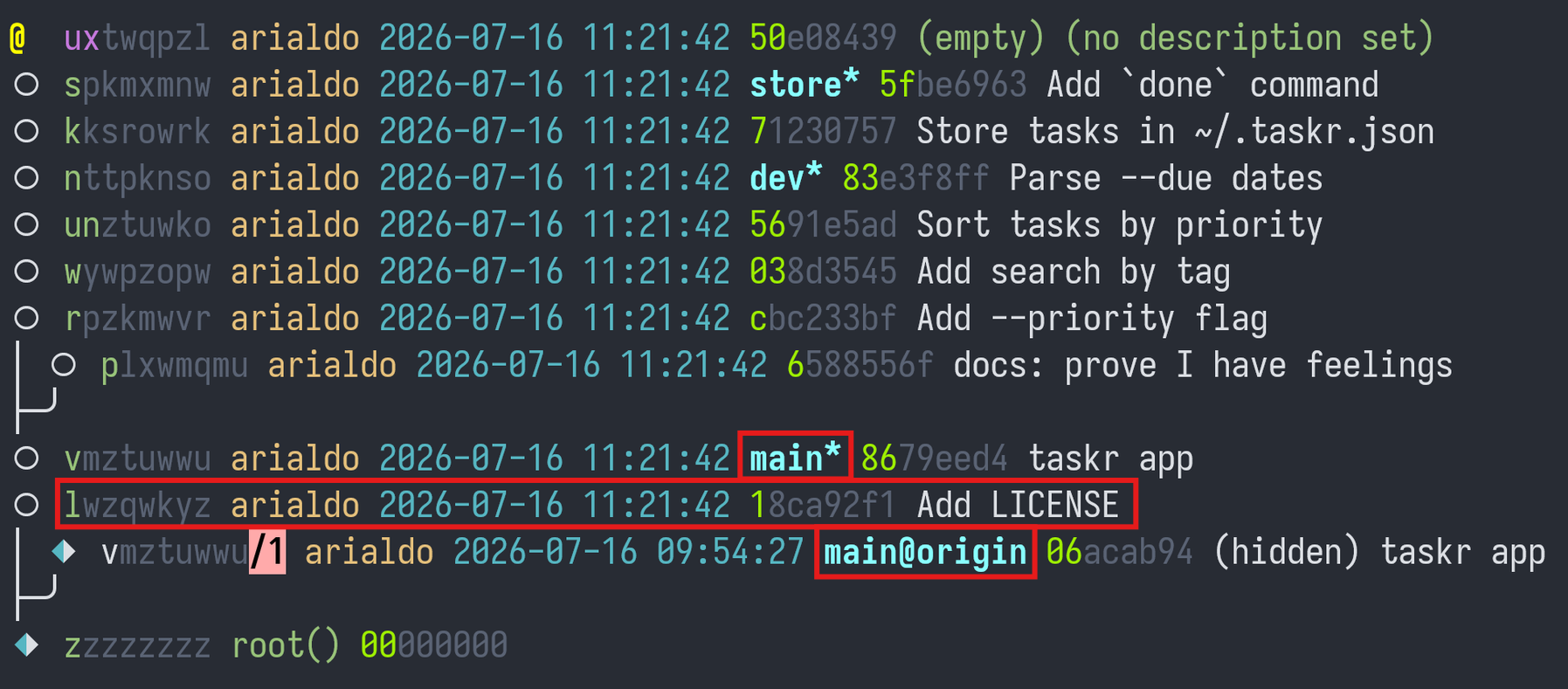
Jujutsu makes it clear that the local main and the remote main
diverge.
13. And Git?
$ git log --oneline --graph
git log --oneline --graph
* 5fbe696 (HEAD, store) Add `done` command
* 7123075 Store tasks in ~/.taskr.json
* 83e3f8f (dev) Parse --due dates
* 5691e5a Sort tasks by priority
* 038d354 Add search by tag
* cbc233b Add --priority flag
* 8679eed (main) taskr app
* 18ca92f Add LICENSE
It's still a 100% Git compatible repository. Your teammates won't even notice that you are playing with your brand new toy.
What's not to love?