Log and Identity
Important
You discover Change IDs: immutable identifiers referencing commits as they evolve.
Git amend is a nice abstraction, but still a little abstraction leak. See this:
git log --oneline
  ddb8cf5 (main) Publish shell script

echo "fix typo" >> myfile
git commit -a --amend --reuse-message=HEAD

git log --oneline
  bea2735 (main) Publish shell script
Within Git amend’s metaphor, you modified the last commit. Yet git log insists on screaming at you:
That’s not the same commit! It was
ddb8cf5before, it’sbea2735now!
Do you need this constant reminder? Must Git always be so pedantic?
We often communicate above the SHA1 level, just saying “the last commit”. Git hided the old commit, for a good reason; why not hide the identity change too?
Immutable identity
Enter Jujutsu:
jj log
@  mttlksm arialdo@ik.me 2026-06-06 15:55:54 2caa192jj
│  (empty) (no description set)
○  **v**syzrms arialdo@ik.me 2026-06-06 15:55:04 ddb8cf5
│  Log and Identity
...
Focus on the last ○ item. The rightmost ddb8cf5 is the Git
SHA1. The vsyzrms (v for short) on the left is the Change ID, an
immutable reference to “the last commit”:
Let’s amend, Jujutsu style:
jj edit v
echo "fix typo" >> myfile
jj log
@  **v**syzrms arialdo@ik.me 2026-06-06 15:55:04 bea2735
│  Log and Identity
...
Interesting! While the SHA1 changed, the Change ID remained
stable. You can keep calling that Change v forever.
Git does this with branches (main points to new commits but remains
main). Jujutsu extends this to all commits.
Reverse Hex
Will Change IDs and Git Commit IDs clash? They can’t! Git SHA1s
use hex symbols (0-9, A-F), Change IDs use reverse
hex (Z-K). They
never overlap. Smart!
Show me less
Notice how jj log grays out most ID characters?
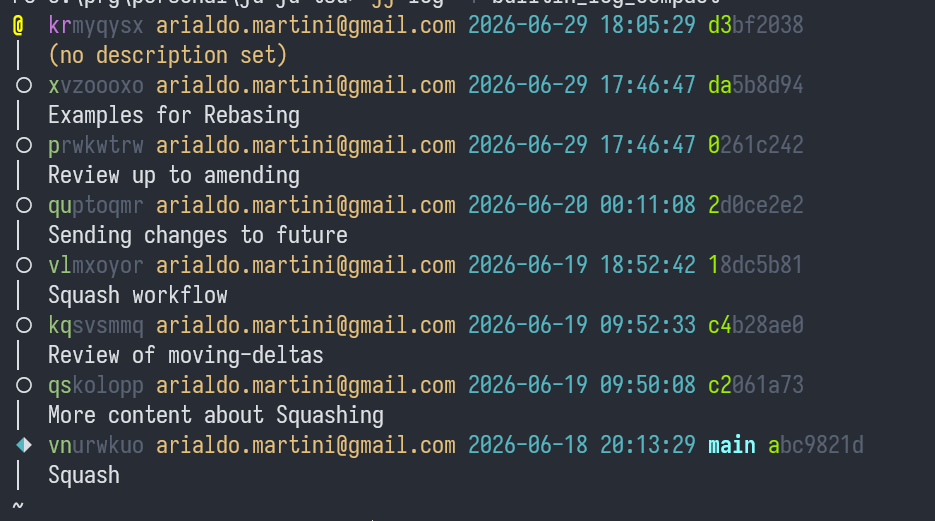
Git only displays the first 7 characters of SHA1s. Why 7? Because
it’s usually enough to prevent ambiguity. In fact, Git could
use less, but it doesn’t try to optimize.
Jujutsu goes a step further: if 2 chars prevent ambiguity, it
grays out the rest.
Take it to the limit
When something is Good™, it deserves to be taken to the next level.
Instead of:
@  xlptstlm arialdo@ik.me 2026-06-06 17:18:46 039a04d
│  (no description set)
◆  poqzxkvk arialdo@ik.me 2026-06-06 16:32:39 main 9376594
│  Review of identity
~  (elided revisions)
│ ○  zzmuxzrl arialdo@ik.me 2026-06-06 16:32:45 pages 29b4782
│ │  typo: need -> needs
│ ○  wuwotnsy arialdo@ik.me 2026-06-06 16:23:08 e655e34
│ │  Review of Why
│ ○  puvzpnwv arialdo@ik.me 2026-06-06 15:19:09 eae4a1f
│ │  PRs are welcome
│ ○  zzsynxzk arialdo@ik.me 2026-06-06 14:26:10 3e3cf7b
│ │  Publish script
│ ○  yroskows arialdo@ik.me 2026-06-06 14:08:55 af28aa37
├─╯  init pages branch
◆  zzz root() 0
I prefer:
@  x
◆  po   🔒  Review of identity main
~  (elided revisions)
│ ○  zzm      typo: need -> needs pages
│ ○  w        Review of Why
│ ○  pu       PRs are welcome
│ ○  zzs      Publish script
│ ○  y        init pages branch
├─╯
◆  zzz  🔒  empty
This style:
- Hides the Git SHA1 entirely.
- Displays only bare minumum of Change IDs.
- Use 1 line per commit.
I’ll use this template from now on. Check Human Friendly Log to have it too.
In practice
- Run
jj git initin any Git repo. - It’s safe: it lives in a
.jjdirectory Git will ignore. - Keep using Git as usual.
- When you need, use Jujutsu as a Git client on steroids.
- Try
jj log. It’s harmless and often cleaner thangit log.
Let’s Dive In
During our amend, you never committed, yet you amended commits. How
can it be?
Time to find out!